Case study 02 of 06
THREE Insurance
Quotes, policy changes, invoices, receipts, renewals and cancellations. Every one of them is a message a business owner needs to trust, and every one is built from live policy data.
- Client
- THREE by Berkshire Hathaway
- Industry
- Insurance / Financial Services
- Discipline
- Transactional email & marketing automation
- Scope
- Ten transactional templates
- Related role
- Salesforce Marketing Engineer, Next Level Solutions
Overview
THREE sells small-business insurance directly, so email is a primary service channel. The templates here cover the policy lifecycle: a quote is ready, a policy changed, a payment is due or received, a policy renews, expires or is cancelled.
Transactional email carries less room for error than marketing email. A policy number, a premium or a cancellation date that renders wrong is a customer-service call at best. The work is as much about data and structure as it is about layout.
Technical scope
Personalization strings and AMPscript
Names, policy numbers and quote IDs use personalization strings. Dates and currency are formatted inline with AMPscript, for example FormatDate on effective and expiration dates and FormatNumber on payment amounts.
One system, many triggers
All ten templates share a header, a document-type strip, a headline with a rule, a support module and a dark footer. Only the body changes between a receipt and a cancellation.
Lifecycle coverage
Quote, policy service, billing, renewal and expiration, and two cancellation paths, each with its own data requirements.
Proofing with real values
Rendered test sends with sample data confirm that every field resolves and that long values do not break the layout before a template goes live.
From quote to cancellation
Ordered by where they fall in a policy's life. Select any template to inspect it at full resolution.
- 01
Quote ready
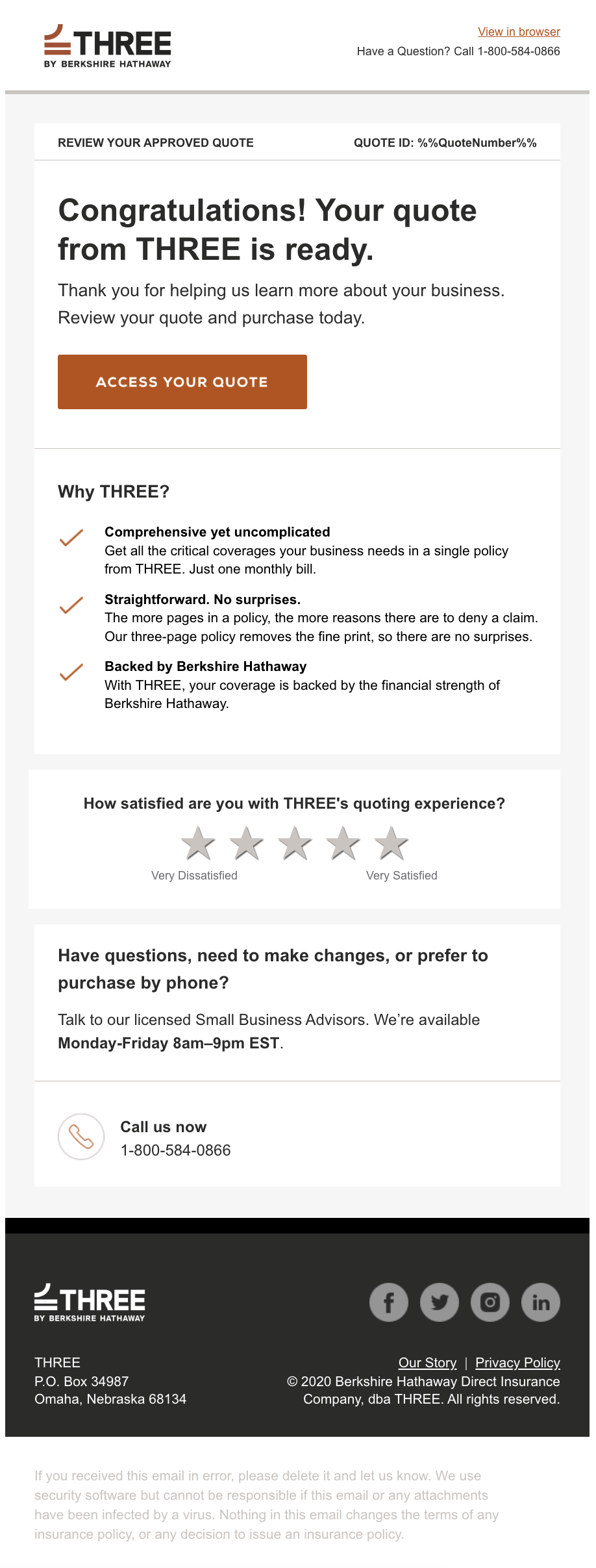
Quote-ready template with the quote ID personalization string in the header strip, benefits list and a one-tap satisfaction rating.
- 02
Quote ready, rendered test send
The same template rendered with sample data, the kind of proof used to confirm fields resolve before a template goes live.
- 03
Policy change confirmation
Confirms a policy change and sends the customer to their account space for the revised documents.
- 04
Policy access link
A one-time, 30-minute link to policy documents. Short copy, one action.
- 05
Invoice due
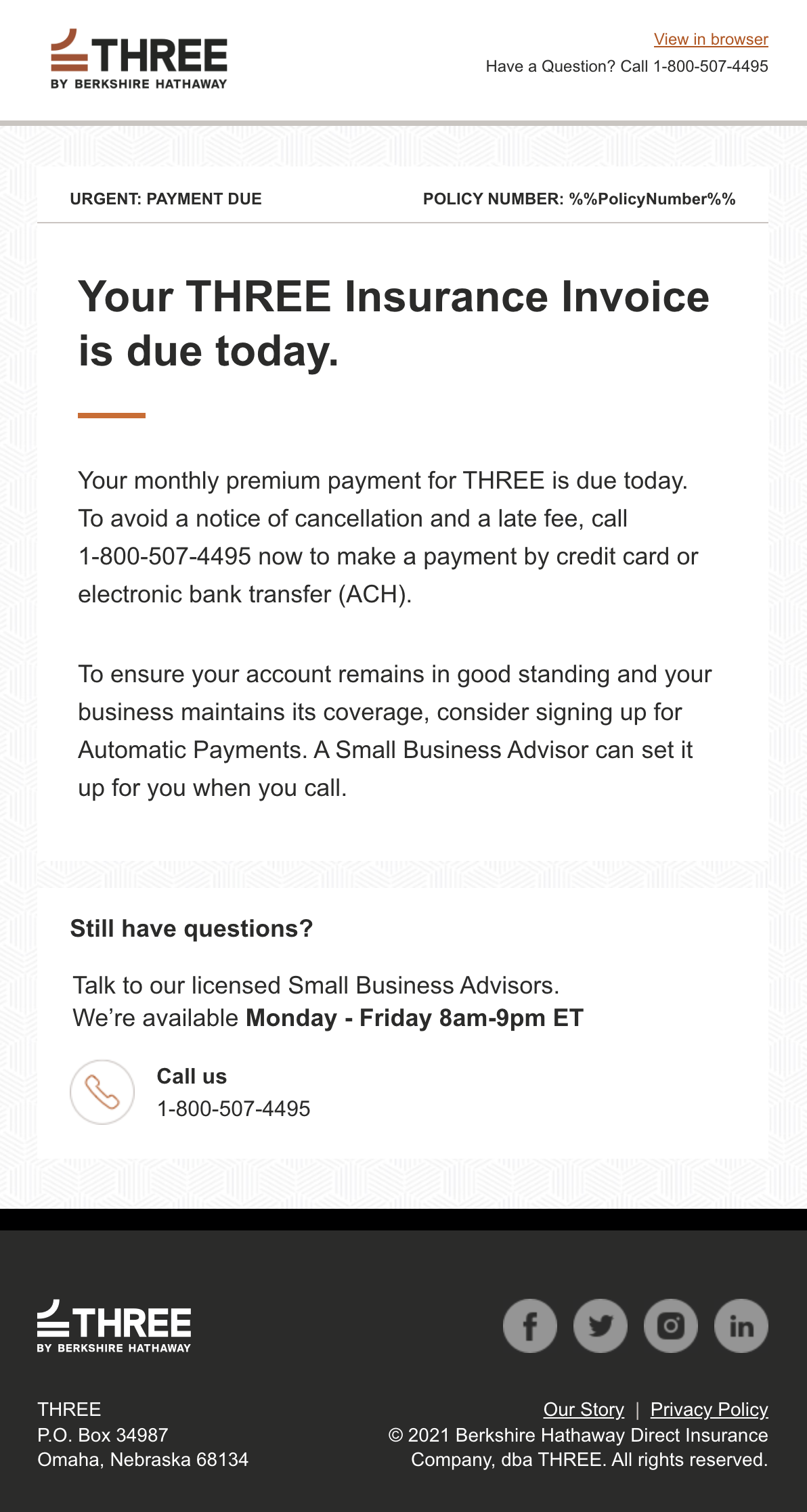
Payment-due notice. The header strip changes to an urgent label while the rest of the system stays the same.
- 06
Payment receipt
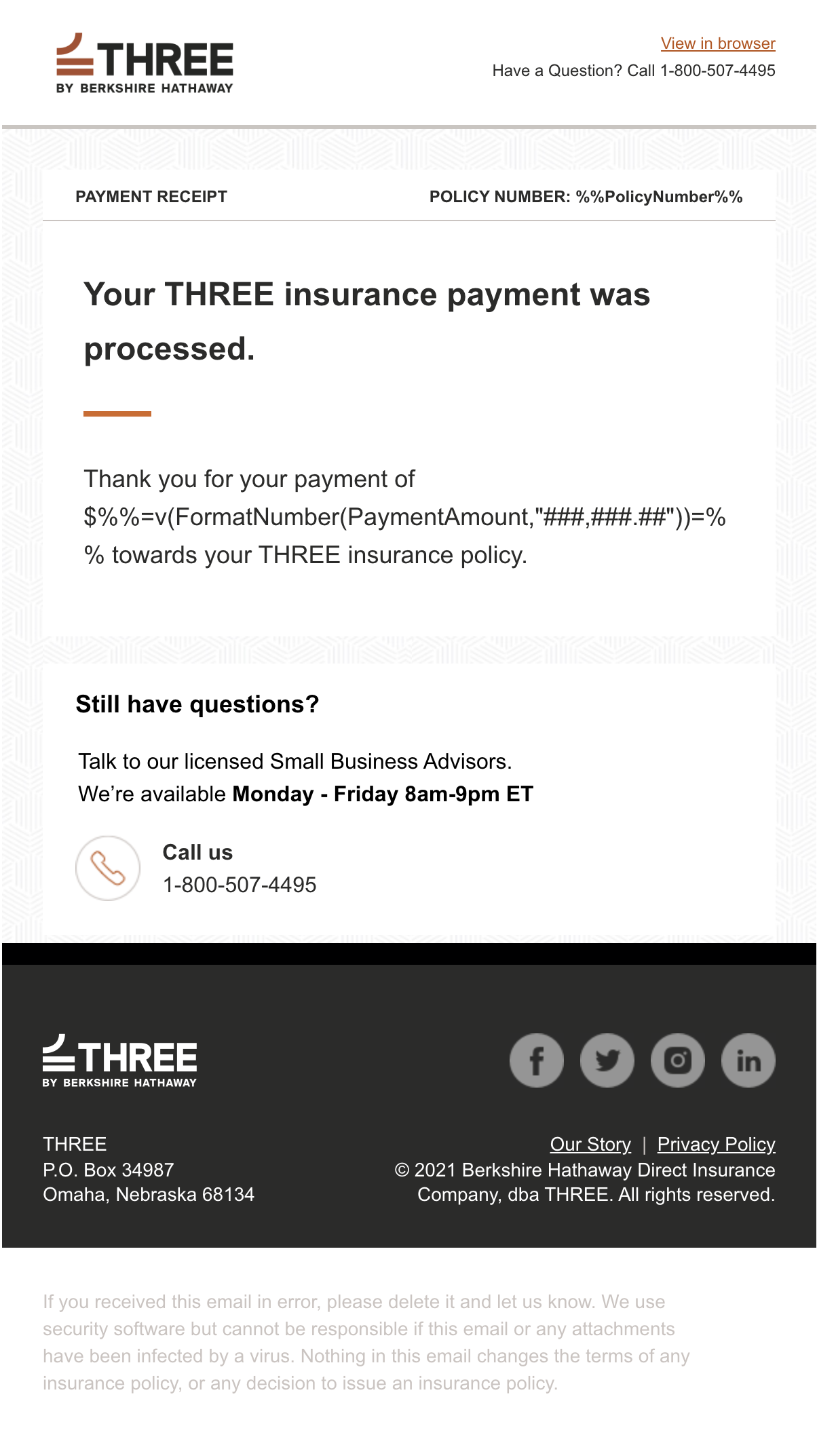
Receipt template. The amount is formatted inline with AMPscript rather than pre-formatted in the data.
- 07
Policy renewal
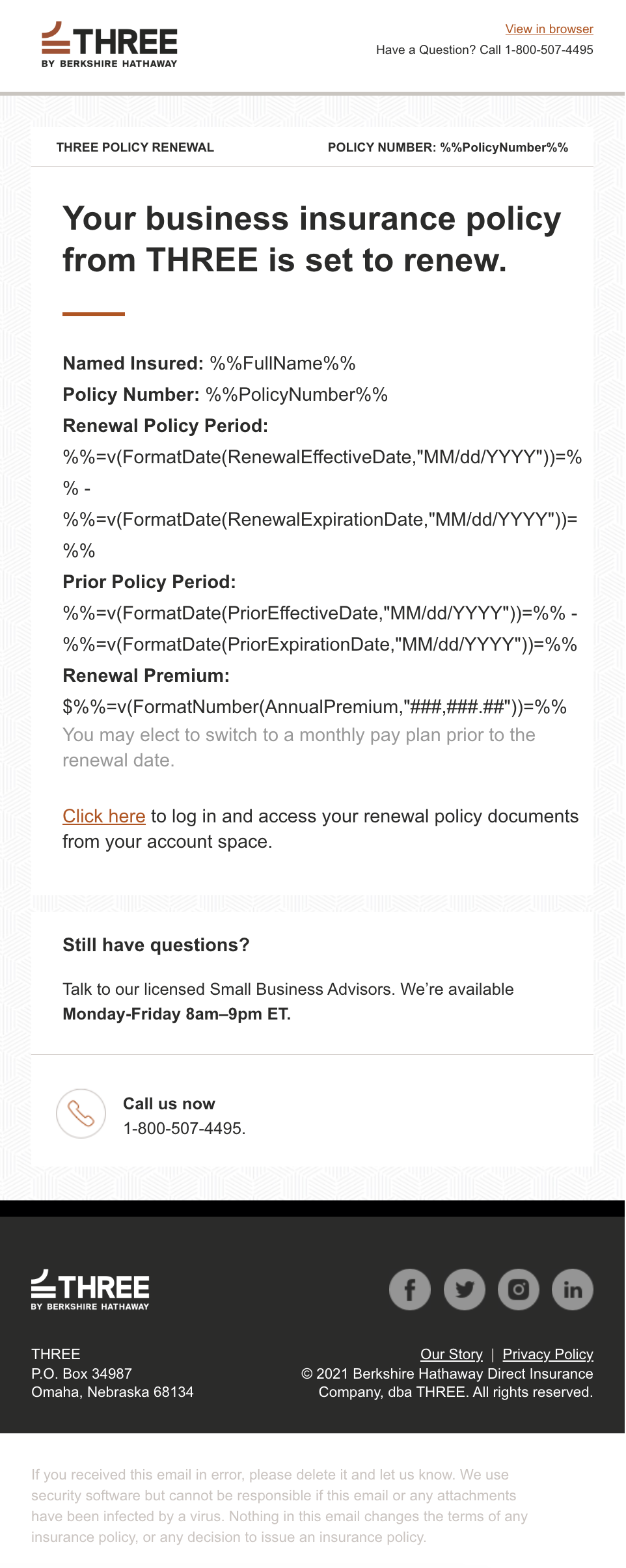
Renewal notice with named insured, both policy periods and the renewal premium all resolved at send time.
- 08
Policy expiration
Non-renewal notice. The expiration date is called out on its own line so it cannot be missed.
- 09
Cancellation with premium audit
Cancellation variant that adds the premium-audit explanation for policies that need a final balance settled.
- 10
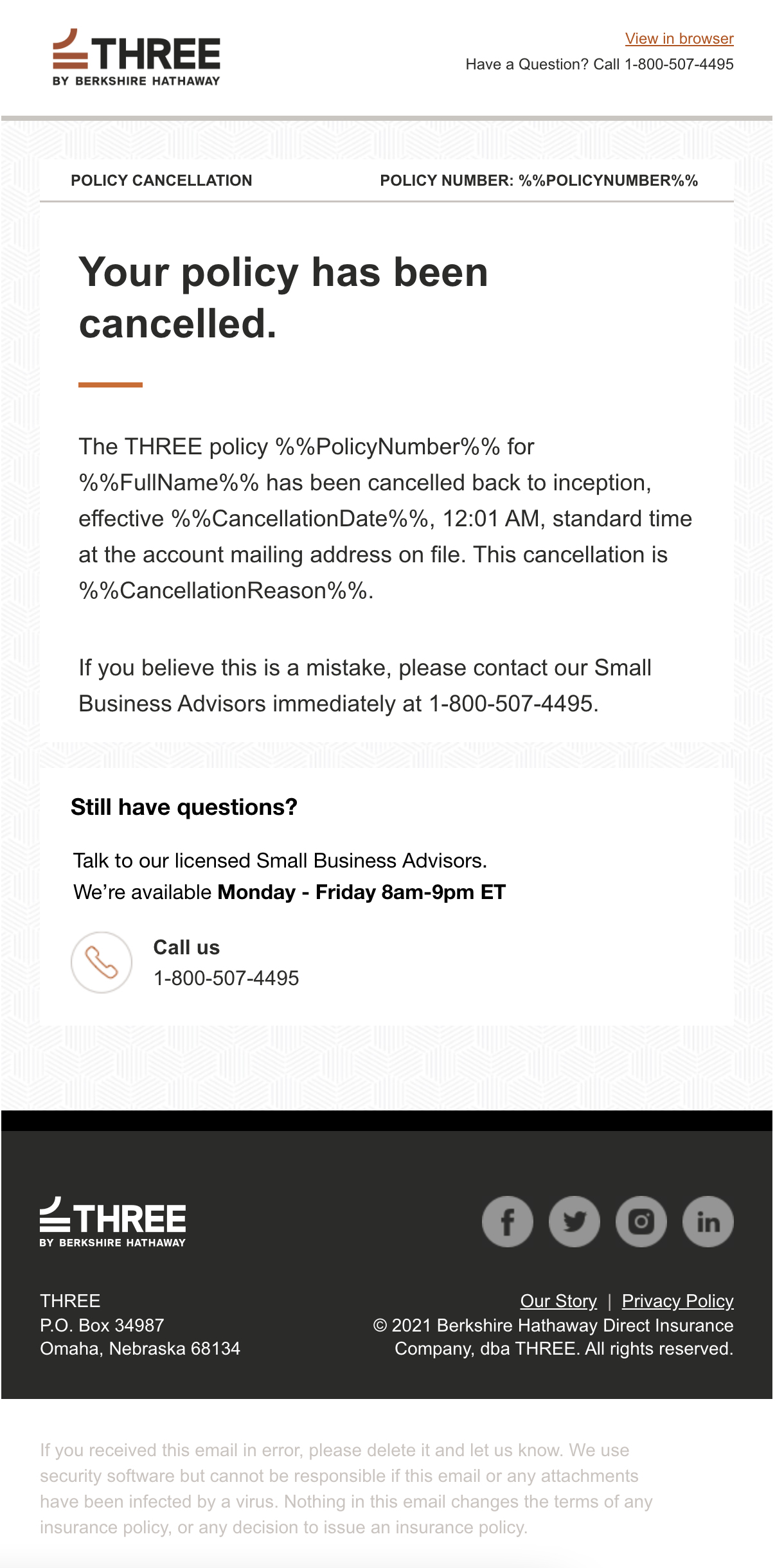
Flat cancellation
Cancellation back to inception, sharing every module with the audit variant except the closing paragraph.
Anatomy of a renewal notice
Policy renewal, shown complete. Scroll alongside the notes, or open it in the viewer to zoom.
- 01
Header and document strip
View in browser, the support number and a strip naming the document type next to the policy number.
- 02
Policy detail block
Named insured, policy number, renewal period, prior period and renewal premium. Each value comes from data, with dates and currency formatted by AMPscript.
- 03
Account action
A single link into the customer's account space for renewal documents.
- 04
Support and footer
The same licensed-advisor module and dark legal footer that close every template in the system.
Policy renewal
Up close
Formatting at send time
Policy periods and the renewal premium are written as AMPscript expressions, so the data can stay raw and every template formats dates as MM/dd/YYYY and currency with grouping in the same way.
Excerpt. Select it to zoom; the complete email is shown above.
The strip that tells you what this is
Every template opens with a document-type label beside the policy number. In a crowded inbox, that strip is what separates a receipt from a cancellation at a glance.
Excerpt. Select it to zoom; the complete email is shown above.
Technical considerations
Data-driven personalization
Every template depends on fields resolving correctly. Test sends with sample data are part of the build, not an afterthought.
Responsive engineering
Detail blocks with long AMPscript-generated values need to wrap gracefully on narrow screens without breaking labels from their values.
A consistent design system
Shared header, strip, support module and footer keep ten templates maintainable and recognizably from the same company.
Technologies and capabilities
- Salesforce Marketing Cloud
- AMPscript
- Personalization strings
- Transactional email
- Customer lifecycle messaging
- Responsive HTML/CSS
- Modular templates
- Campaign QA
Let’s build something exceptional.
Looking for someone who understands both the technology and the marketing behind great digital experiences? Let’s connect.